
Prisma Art Effect Photo Editor
Prisma Labs, Inc.Photography
4.519.92K Reviews
- Version
- 4.6.6.637
- Installs
- 50.00M
- Age Rating
- Everyone
Screenshots
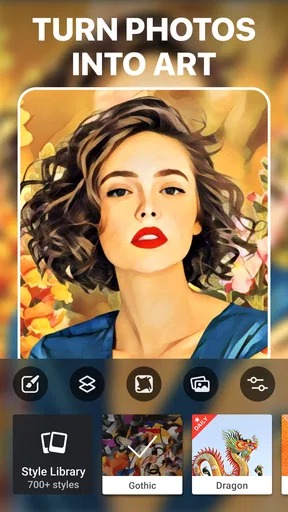
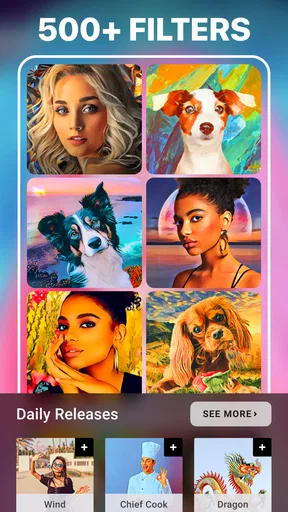
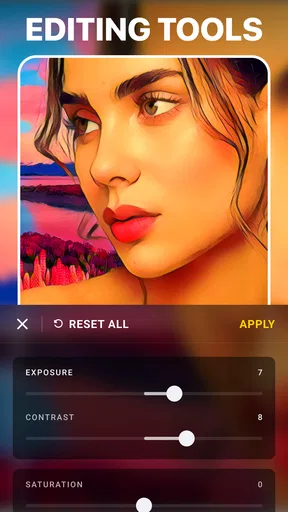
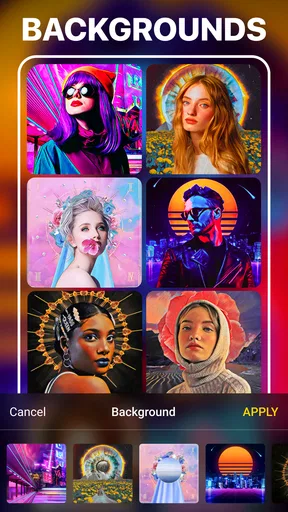
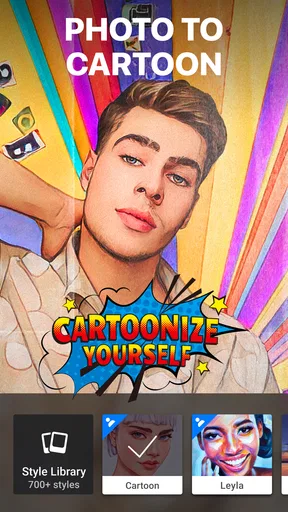
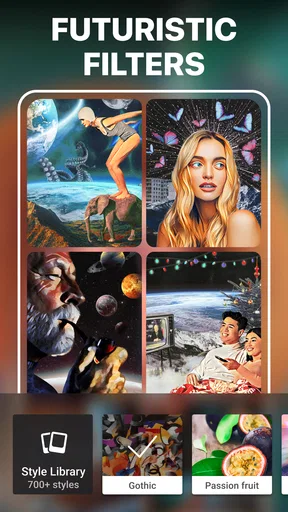
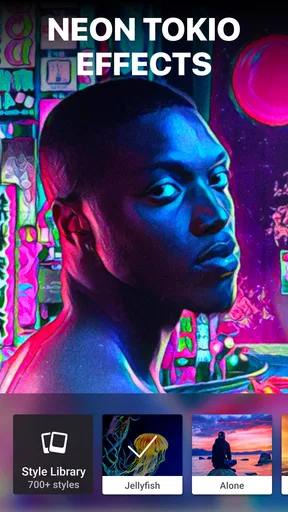
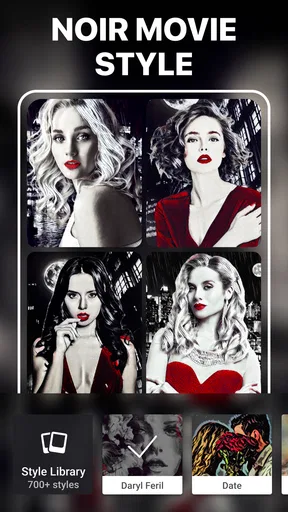
Our Review of Prisma Art Effect Photo Editor
 Analysis by Appyee
I approached Prisma Art Effect Photo Editor as a photo tool rather than just another filter app. Its main appeal is turning an ordinary picture into something that feels deliberately illustrated, painted, or stylized, while still offering retouching and selfie-oriented editing. After spending time with it, I found a creative editor that is easy to enjoy in short sessions, but one that deserves a more careful look when privacy, subscriptions, and editing control matter as much as visual impact.
Prisma Labs, Inc. develops the app, which sits in the photography category and is free to install. It is rated for Everyone, runs on Android 9 and later, and the current version is 4.6.6.637. Its broad reach is reflected in more than 50 million installs, while its average score is around 4.5 from roughly one million ratings. Those figures suggest a mature, widely used product, although popularity alone does not tell me whether its data choices or editing style will suit every person.
What the artistic workflow feels like in everyday use
The first thing I noticed is that Prisma is built around transformation, not painstaking manual correction. I can begin with a camera image or a picture already saved on my phone, try an artistic treatment, and quickly judge whether the result has the mood I want. That makes it especially pleasant when I have a photo that is technically ordinary but visually promising: a street scene with flat light, a pet sitting still for once, or a portrait that needs a stronger creative identity.
The effect is not simply a color wash placed over the original. The best results change the apparent structure of the image, so faces, buildings, foliage, and clothing can take on a more illustrated character. That is also why the outcome can be unpredictable. A filter that looks excellent on a close portrait may make a busy background muddy, while a style that works on architecture can exaggerate facial details in an unflattering way.
I recommend testing several looks before making small adjustments. My practical habit is to choose the image first, apply a few contrasting styles, and only then decide whether retouching is needed. Starting with skin smoothing or cropping can hide the fact that the chosen artistic treatment is simply a poor match for the picture. Prisma is more enjoyable when I treat each filter as a visual interpretation rather than as a correction that must preserve every original detail.
The strongest use case is fast visual experimentation. If I want a profile image, a playful picture for a private chat, or an unusual version of a travel photo, the app gets me to a distinctive result faster than a traditional editor with many sliders. It is less compelling when I need accurate color, careful masking, precise object removal, or a dependable professional finish.
Why the result depends so much on the source image
Good source material matters more here than many newcomers expect. A reasonably sharp image with a clear subject gives the artistic processing something recognizable to work with. Very dark pictures, tiny crops, and photographs with several competing subjects can produce results that look confused rather than expressive. I get better outcomes by choosing one visual focal point and leaving enough surrounding space for the style to shape the composition.
For portraits, a natural expression usually works better than an exaggerated pose. The app can make a relaxed face feel painterly, but it can also intensify awkward shadows or emphasize details I would have softened in a conventional editor. I therefore compare the stylized version with the original before sharing it, especially when the image is meant to represent someone else.
A useful workflow is to keep the original untouched, create a stylized copy, and make the final decision only after viewing both at normal size. The thumbnail can make an effect look impressive because strong contrast catches the eye. At full size, however, I may notice rough edges, facial distortions, or a background that has lost its sense of depth. This simple comparison prevents the app’s most dramatic option from automatically becoming the best option.
Retouching and selfies: helpful, but not the whole experience
The store summary presents the app as an aesthetic editor that also supports retouching and funny selfies. In practice, I see those functions as companions to the artistic effects rather than a replacement for a dedicated beauty camera. Prisma’s personality is strongest when the image is meant to look transformed. Someone looking mainly for live makeup, extensive face reshaping, or a large catalog of conventional portrait controls may find a specialist selfie editor more focused.
For a casual selfie, the artistic treatment can be more forgiving than a heavy beauty filter because it changes the overall visual language instead of merely trying to perfect the face. That makes it useful for avatars and humorous images. The trade-off is that an art effect can also make a person less recognizable, so I would not use the most extreme styles when the purpose is identification or a clear professional headshot.
I also prefer subtlety when the picture will be seen repeatedly. A highly stylized image is memorable at first, but a lighter treatment often remains appealing longer. If the control allows me to reduce the intensity of an effect, I use that option instead of choosing a weaker style blindly. This preserves more natural facial structure and background detail while keeping the artistic character.
How it compares with ordinary photo editors
Compared with a standard editor, Prisma asks me to make fewer technical decisions. A conventional tool is better for exposure, white balance, perspective, selective adjustments, and preparing an image for print. It gives me control over why a picture looks different. Prisma is better at answering a different question: what if this photograph belonged to a completely different visual world?
That distinction is important before downloading it. If I regularly correct landscapes, remove distractions, or build precise social-media layouts, I would keep a general-purpose editor available. If I want a recognizable photograph to become a painting-like image without learning a complex workflow, Prisma is more satisfying. It can also work alongside a traditional editor: I can make basic corrections elsewhere, create the artistic version here, and then return to the other tool for cropping or final tonal adjustments.
Compared with a basic filter app, Prisma feels more intentional because its effects are designed to alter the image’s character rather than just shift hue and contrast. The downside is that the results may be less predictable and less natural. A simple filter is usually safer for preserving the original scene; Prisma is the better choice when a little visual risk is part of the point.
Free access, paid choices, and avoiding accidental commitment
The app is free, but it includes in-app purchases ranging from $0.99 to $49.99 per item. That range is wide enough that I would pay attention during setup and while browsing locked creative options. A free download does not mean every style or editing path is included, so I would first explore what is available without paying and decide whether the included experience already meets my needs.
My advice is to treat every purchase screen as a decision point rather than tapping through it automatically. Check the wording, the duration of any offer, and the confirmation screen shown by the operating system. If you only want occasional artistic edits, paying for a single useful option may make more sense than committing to something you will rarely open. If the app presents a trial or recurring plan, I would review the cancellation controls in the relevant app-store account immediately, not rely on memory later.
This is also where Prisma may not be right for someone who wants a completely open-ended editor with no locked creative choices. The free starting point is attractive, but users who expect every effect to be available without additional spending could become frustrated. I would install it for the style of the results, not on the assumption that the whole catalog is included at no cost.
Trust starts with visible choices, not popularity
A large install base and a strong average rating make the app easier to notice, but they are not a substitute for checking the choices presented on my own device. Before importing a personal portrait or granting access to photos, I look at the permission prompt carefully and allow only what is needed for the task. If the operating system offers limited photo selection, I prefer choosing individual images instead of opening my entire library.
That habit is particularly relevant with a photography app because a gallery can contain much more than the picture I intend to edit: family images, screenshots, documents, travel records, and private conversations saved as images. I do not assume that an editor needs unrestricted access simply because it can work with photos. I read the wording shown by the operating system and revisit permissions later through device settings if my use changes.
I also separate creative convenience from trust. The fact that an effect looks impressive does not tell me how an image is processed, retained, or used. Those questions should be answered by the app’s current privacy information and the controls visible in the product and operating system. I would not infer a reassuring data practice merely from the app’s age, rating, or developer reputation.
Data-sensitive moments deserve extra care
Portraits are not interchangeable with landscapes. A picture of a building may feel low-risk, while a child’s face, an identity document, a medical image, or a private family moment carries a very different level of sensitivity. I would avoid using Prisma for documents or images that contain confidential information unless I had first reviewed the current privacy terms and understood the processing choices presented to me.
The same caution applies when editing someone else’s photograph. Before turning a friend’s face into a joke image, I would ask whether that person is comfortable with the result being saved or shared. The app makes playful transformation easy, but ease can remove the pause that normally comes before publishing. I consider the intended audience before exporting, especially when the effect changes someone’s appearance in a way they did not request.
For routine use, I keep a clean workflow: select one image, edit it, save only the version I need, and remove temporary copies from the device afterward. This does not answer every question about remote processing, but it reduces unnecessary local exposure and keeps my camera roll manageable. I also avoid editing sensitive images over an unfamiliar network when I can wait for a connection I trust.
Account control and practical user agency
When an app offers purchases or personalized creative content, I want to know which actions are tied to my app-store account and which are tied to an in-app account, if one is requested. I do not create an account automatically just to test a few effects. If sign-in appears, I first look for a way to continue without it and consider whether the extra convenience is worth sharing another identifier.
I also check notification permissions rather than accepting every prompt. An editing app does not need to interrupt me to be useful, and limiting notifications makes it easier to judge the product on my own schedule. The same principle applies to camera and microphone access: I grant access when I am actively using a related function and review it afterward if I no longer need it.
These are small controls, but they change the experience. I feel more comfortable experimenting when I know I selected the images, permissions, notifications, and purchase path deliberately. If a screen makes an important choice difficult to understand, I stop and read it instead of assuming the default is harmless. That is a reasonable standard for any creative app handling personal pictures.
Where the app can disappoint
Prisma’s artistic strength is also its clearest limitation. The transformation can overpower the photograph, and not every style respects the subject equally. Fine text, repeating patterns, hair, fingers, and complex scenery are areas where I inspect the result closely. A picture that looks excellent in a small preview may not hold up when enlarged or used as a print.
The app is also not my first choice for speed when I need a faithful edit. If I am correcting a crooked horizon, matching colors across a set of product photos, or preparing a clean image for work, I want predictable controls. Prisma encourages discovery and interpretation, which is valuable creatively but inefficient when accuracy is the priority.
Another limitation is personal taste. Some people want photographs to remain recognizably photographic, with only a gentle improvement in lighting or skin tone. For them, the app’s signature approach may feel excessive. I would skip it if my main goal were natural retouching, detailed manual editing, or a fully transparent workflow whose changes I can explain one by one.
Who should install it, and who should pass?
I think it is a good fit for casual creators, social-media users, people making playful avatars, and anyone who enjoys testing visual ideas without spending a long time learning editing theory. It is especially useful when the goal is a distinctive image rather than a technically perfect one. The free entry point makes it easy to explore before deciding whether the paid options add enough value.
I would be more cautious recommending it to professional photographers, privacy-sensitive users working with confidential portraits, or anyone who needs detailed control over every adjustment. Those users should examine the current permissions, privacy explanations, account controls, and purchase terms before importing important images. A different editor may be a better match if manual precision matters more than expressive automation.
Families should also remember that an Everyone content rating describes the general suitability of the app, not the wisdom of sharing every edited image publicly. I would show younger users how to choose photos carefully, avoid personal documents, ask permission before editing another person, and check purchase prompts with an adult. The creative tools are approachable, but responsible sharing still requires judgment.
My cautious verdict after using it
Prisma succeeds because it gives ordinary photographs a strong point of view. I can take an image that feels forgettable and quickly turn it into something that looks made rather than merely captured. That makes the app more memorable than a basic filter collection, and the combination of artistic effects, retouching, and playful selfie editing gives it several casual uses.
I would not describe it as a complete replacement for a serious photo editor. Its strongest results depend on choosing the right source image and accepting that the software will reinterpret details in ways I cannot always predict. The paid range also means I would explore carefully before committing, while privacy-conscious use requires me to inspect the permissions and choices shown on my device rather than relying on popularity.
Overall, I recommend trying it if you want fast, expressive transformations and are comfortable making deliberate decisions about photos, permissions, accounts, and purchases. I would skip it for confidential material or precision-heavy editing unless I had reviewed the current controls closely. Used with that caution, it is a genuinely enjoyable photography app: less about perfect correction, more about discovering which version of a familiar picture feels worth keeping.
Verdict
Strengths of Prisma Art Effect Photo Editor
- Transforms photos with distinctive painting and artistic effects.
- Offers a wide selection of filters inspired by famous art styles.
- New filter releases help keep the editing experience fresh.
- Simple interface makes applying effects quick for beginners.
- Works well for creating eye-catching social media profile images.
Limitations of Prisma Art Effect Photo Editor
- Many premium filters and tools require a paid subscription.
- High-resolution processing can take longer on older devices.
- Some effects may look overly strong without manual adjustments.
- Frequent processing may use considerable battery and mobile data.
- Results can vary significantly depending on the original photo quality.
Other Releases by Prisma Labs, Inc.
View All
Lensa: photo editor & AI art
Photography4.1
Similar Picks in This Category
View All
Google Photos
Google LLC4.4

Gallery
Google LLC4.2

Picsart AI Photo Editor, Video
PicsArt, Inc.3.9

B612 AI Photo&Video Editor
SNOW Corporation4.1

BeautyPlus-Selfie Photo Editor
PIXOCIAL TECHNOLOGY (SINGAPORE) PTE. LTD.4.5

Remini - AI Photo Enhancer
Bending Spoons4.1
Frequently Asked Questions
What is Prisma Art Effect Photo Editor?
Prisma Art Effect Photo Editor is a mobile app that transforms ordinary photos into artwork inspired by different artistic styles. After selecting an image, you can apply filters that imitate painting, illustration, sketching, and other visual techniques. The app is designed for quick creative edits, whether you want to enhance a portrait, create a stylized landscape, or share an artistic version of a picture online.
Is Prisma Art Effect Photo Editor free to download and use?
Prisma can generally be downloaded for free, but access to the complete collection of filters and advanced editing tools may depend on a subscription or in-app purchases. The free version provides enough effects to test the main experience, although some popular styles may be restricted. Before subscribing, check the current pricing, trial conditions, and renewal details shown in the app store or inside the application.
Does Prisma require an internet connection?
Some Prisma features may require an internet connection, particularly when images are processed through online services or when new artistic filters and content are loaded. Basic browsing and editing availability can vary depending on the version of the app and the device. If you plan to edit photos while traveling or without mobile data, test the desired filters beforehand and do not assume that every effect works offline.
Can I use Prisma to edit photos already stored on my phone?
Yes, Prisma is primarily designed to work with photos selected from your device’s gallery, and you can usually choose an existing image before applying an artistic effect. Depending on the app version, you may also be able to take a new photo directly through the editor. The final result can normally be saved to your device or shared through compatible social media and messaging applications.
Does Prisma keep my photos or protect my privacy?
Before using Prisma, review its current privacy policy and the permissions requested by the app. Photo processing, cloud-based features, analytics, and account services may involve sending certain image or usage data to external servers. Avoid uploading sensitive or confidential pictures unless you understand how they are handled. Also check your device permissions so the app only receives access to the camera, photos, and other features you are comfortable allowing.
